
Views: 1680 Author: Site Editor Publish Time: 2026-03-26 Origin: Site


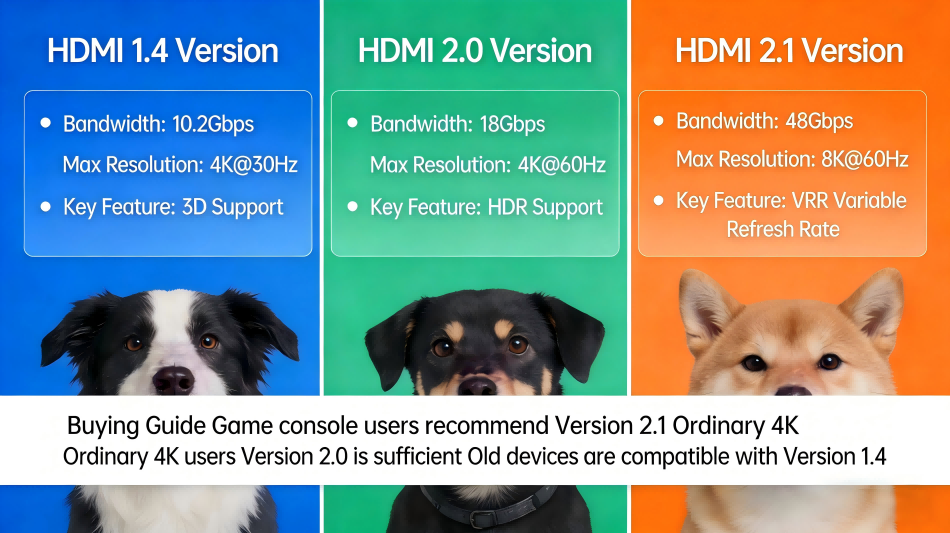
When inquiring about the type of HDMI cable required from most individuals, one is likely to encounter confusion. However, when asking users who have recently purchased a PS5, they may respond: 'HDMI 2.1 — but I am not entirely sure of the reasons.' In fact, while HDMI versions may sound technically complex, they become truly straightforward and comprehensible with clear explanation.
This guide does exactly that. We'll walk through HDMI 1.4, HDMI 2.0, and HDMI 2.1 — what each version actually delivers, where each version falls short, and which one you need for your specific devices and setup. By the end, you'll know exactly which cable to buy and why.
Let's get into it.
HDMI stands for High-Definition Multimedia Interface. It's the standard connection that carries both video and audio between your devices — from your console to your TV, your laptop to a monitor, your set-top box to your home theatre system.
Here's the practical result of a bandwidth mismatch: plug an HDMI 1.4 cable into a PS5 and you won't get 4K 120Hz. The cable can't physically carry that much data. You'll get a downgraded picture — likely 1080p or 4K at a much lower frame rate — without any obvious warning that it's happening.
The fix is simple: understand the versions and match your cable to your hardware. That's what this guide is for.
HDMI 1.4 was introduced in 2009 and became the unversial standard by the mid-2010s. If you have cables from that era—those that came bundled with older televisions, Blu-ray players, or gaming consoles—they are very likely HDMI 1.4.
• Maximum bandwidth: 10.2Gbps
• Full HD (1080p) at 120Hz
• 4K at 24Hz — enough for 4K Blu-ray, but not much else
• 3D video support
• Audio Return Channel (ARC) — basic version
• Ethernet channel (rarely used)
The fundamental issue with HDMI 1.4 is its bandwidth limit of 10.2Gbps. 4K content at 60Hz requires approximately 18Gbps of bandwidth—nearly twice what HDMI 1.4 can support. This implies that:
• No 4K at 60Hz — you're stuck at 4K 24Hz at best, which is jarring for anything except cinematic film
• No HDR (High Dynamic Range) support at 4K — a massive missed feature on modern TVs
• No gaming features like VRR (Variable Refresh Rate) or ALLM
• Incompatible with 8K, obviously
Verdict: HDMI 1.4 is a legacy standard. If you're still using these cables with any modern 4K hardware, replace them now. You're actively limiting your equipment.
HDMI 2.0 was launched in 2013 and remained the dominant cable standard throughout the late 2010s and into the early 2020s. Most televisions sold between 2015 and 2020 featured HDMI 2.0 ports, and the cables included with streaming devices, soundbars, and AV receivers during this period were typically HDMI 2.0.
• Maximum bandwidth: 18Gbps
• 4K resolution at 60Hz — authentic 4K with smooth motion
• HDR (High Dynamic Range) support — including HDR10 and Dolby Vision
• Wide Colour Gamut (WCG)
• Up to 32 audio channels
• 4K 3D content
The transition from HDMI 1.4 to 2.0 was transformative for 4K adoption. HDMI 2.0's 18Gbps bandwidth was sufficient to transmit 4K 60Hz video — and with HDR support, it enabled 4K content to finally appear as intended: sharp, smooth, and vivid.
For streaming services such as Netflix, Disney+, and Apple TV 4K, HDMI 2.0 provided more than adequate performance. For 4K Blu-ray, HDMI 2.0 represented the exact specification required.
HDMI 2.0's 18Gbps bandwidth limit becomes problematic when attempting to exceed 4K 60Hz:
• No support for 4K 120Hz — a key feature of the PS5 and Xbox Series X
• No Variable Refresh Rate (VRR) — resulting in screen tearing during gaming
• No Auto Low Latency Mode (ALLM) — preventing TVs from automatically switching to game mode
• No eARC — restricted to the older ARC standard for audio transmission
• No support for 8K resolution whatsoever
If you have a PS5 or Xbox Series X connected to a 4K TV via an HDMI 2.0 cable, you are not achieving 4K 120Hz. At best, you are limited to 4K 60Hz—and you are missing Variable Refresh Rate (VRR), which significantly impacts the perceived smoothness of games.
Verdict: HDMI 2.0 remains functional for 4K streaming and non-gaming 4K configurations. However, for any gaming scenario involving current-generation consoles, or any setup requiring 4K 120Hz, HDMI 2.0 is already obsolete.
HDMI 2.1 was introduced in 2017 but only gained widespread relevance with the launch of the PS5 and Xbox Series X in 2020. Since then, it has become the default recommendation for any new HDMI cable purchase—for very good reason.
• Maximum bandwidth: 48Gbps — nearly triple that of HDMI 2.0
• 4K resolution at 120Hz — the key specification for current-generation gaming
• 8K resolution at 60Hz
• 4K at 144Hz and beyond with Display Stream Compression (DSC)
• Variable Refresh Rate (VRR) — eliminates screen tearing
• Auto Low Latency Mode (ALLM) — automatically enables game mode on compatible TVs
• Enhanced Audio Return Channel (eARC) — supports lossless Dolby Atmos and DTS:X
• Quick Frame Transport (QFT) — reduces latency
• Quick Media Switching (QMS) — eliminates the black screen when switching sources
The transition from 18Gbps to 48Gbps is not merely an incremental enhancement but fundamentally unlocks capabilities previously unattainable. 4K at 120Hz requires approximately 40Gbps of bandwidth, which cannot be accommodated by an HDMI 2.0 cable. HDMI 2.1 handles this with ample bandwidth to spare.
This excess bandwidth also enables gaming-specific features: Variable Refresh Rate (VRR) operates by dynamically adjusting the frame rate, necessitating the cable to manage a flexible data stream. Auto Low Latency Mode (ALLM) transmits a signal from the gaming device to the TV, automatically activating game mode. These are not software-only features; they require the bandwidth and protocol support provided by HDMI 2.1.
Both Sony and Microsoft designed their current-generation consoles around HDMI 2.1 as the required connection standard for full performance. Here is what you get with and without it:
| Feature | HDMI 2.0 Cable | HDMI 2.1 Cable |
|---|---|---|
| Max Resolution | 4K 60Hz | 4K 120Hz |
| VRR (Variable Refresh Rate) | No | Yes |
| ALLM (Auto Game Mode) | No | Yes |
| eARC (Lossless Audio) | No | Yes |
| 8K Support | No | Yes |
| Future-Proof? | No | Yes |
The difference between 4K 60Hz and 4K 120Hz is immediately visible in fast-moving games. When combined with VRR (Variable Refresh Rate) to eliminate tearing, an HDMI 2.1 cable delivers a noticeably smoother and more responsive gaming experience.
Our HDMI 2.1 cable (2m, 8K) is certified for the full 48Gbps bandwidth — fully unlocking all capabilities of the PS5 and Xbox Series X.
| Key Specifications | HDMI 1.4 | HDMI 2.0 | HDMI 2.1 |
|---|---|---|---|
| Maximum Bandwidth | 10.2 Gbps | 18 Gbps | 48 Gbps |
| Maximum Resolution & Refresh Rate | 4K@30Hz1080p@144Hz | 4K@60Hz1080p@240Hz | 8K@60Hz4K@120Hz1080p@240Hz+ |
| Video Format Support | HDR10 (limited)3D | HDR10HDR10+HLG | HDR10HDR10+HLGDolby Vision8K HDR |
| Audio Support | 7.1 Surround SoundDSD64 | 7.1/5.1 Surround SoundDSD128Dolby TrueHDDTS-HD Master Audio | Dolby AtmosDTS:X32-channel audioDSD256 |
| Special Features | ARCEthernet Channel3D Video | eARC (basic)HDCP 2.2Wide Color Gamut (WCG) | True eARCHDCP 2.3VRR (Variable Refresh Rate)ALLM (Auto Low Latency Mode)QMS/ QFT (Quick Media/ Frame Transport) |
| Typical Use Cases | Old TVs/MonitorsBasic Blu-ray1080p Gaming | 4K 60Hz TVs/Monitors4K Blu-rayMid-range 4K Gaming | 8K/4K 120Hz TVs/MonitorsHigh-end Gaming Consoles (PS5/Xbox Series X)8K Blu-rayHome Theater with Atmos/DTS:X |
Based on your devices and use case:
• PlayStation 5 or Xbox Series X
• A 4K TV with 120Hz support
• A gaming monitor at 1440p or 4K resolution with a high refresh rate
• An eARC-compatible soundbar or AV receiver
• Any setup intended for future-proofing
• A 4K 60Hz television with no gaming use case
• A 4K streaming-only setup (Netflix, Apple TV, etc.)
• A 4K Blu-ray player only
• Any 4K TV — you are limiting your picture quality
• PS5 or Xbox Series X — you are limiting your console's performance
• Any modern streaming device
Our recommendation is straightforward: purchase HDMI 2.1 for any new acquisition. HDMI 2.1 is fully backward compatible—it functions optimally with HDMI 2.0 and 1.4 devices, operating at the speed supported by those devices. There is no justification for not acquiring the most capable cable available
Our HDMI 2.1 cable —fully certified for 4K 120Hz, 8K 60Hz, VRR, eARC, and ALLM.
A: Yes — Entirely. An HDMI 2.1 cable is compatible with any HDMI-compatible device and operates at the highest bandwidth supported by both devices. Connecting an HDMI 2.1 cable to a device that only supports HDMI 2.0 will function perfectly at HDMI 2.0 speeds. Using a newer cable results in no loss of functionality.
A: Yes — Sony includes an HDMI 2.1 cable in the PS5 box. However, the included cable is only 1.5 meters in length. If a longer cable or replacement is required, ensure that one rated for HDMI 2.1 (48Gbps / Ultra High Speed) is purchased to maintain full performance.
A: Yes. Both the cable and the TV's HDMI port must support HDMI 2.1 for 4K 120Hz functionality to operate. Many 4K TVs manufactured prior to 2020 are equipped with only HDMI 2.0 ports; in such cases, even an HDMI 2.1 cable will not enable 4K 120Hz, as the TV is unable to receive the signal. Verify your TV's specifications to confirm the presence of at least one HDMI 2.1 port.
The HDMI version landscape in 2026 is actually very clear: HDMI 1.4 is obsolete, HDMI 2.0 is passable for streaming-only 4K setups, and HDMI 2.1 is the right choice for almost every modern use case. The upgrade cost is minimal and the performance difference — especially for gaming — is significant.


